Start an agent anywhere.
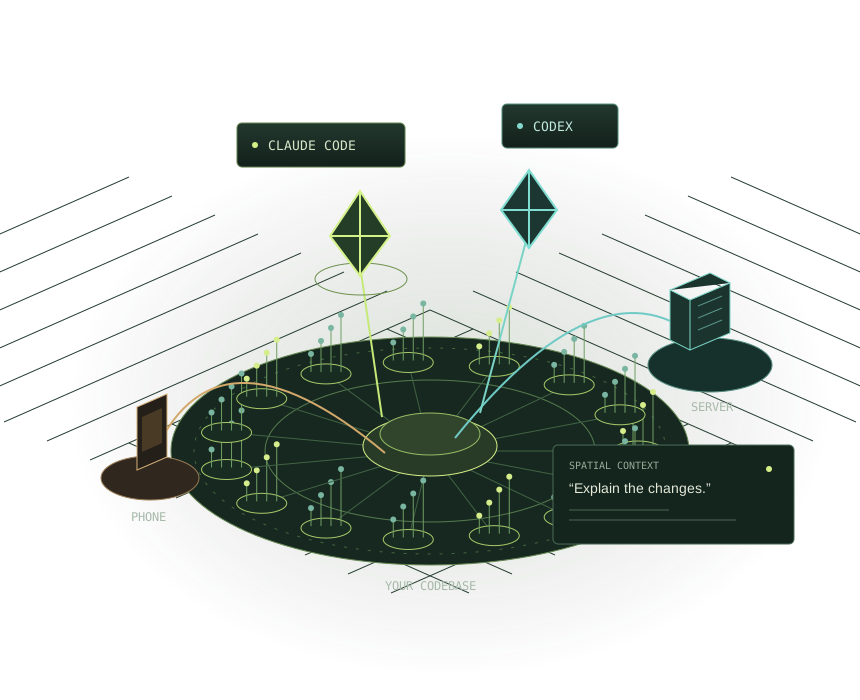
Every machine island and project pad has “Start Claude here” and “Start Codex here”. Agents get what you are pointing at as context, edit the code, and narrate the change while highlighting each element they touched.
 Request a demo
 VR / OPENXR / DESKTOP / BROWSER
Primitive puts your codebase, its running behaviour and the coding agents working on it into one shared 3D world. Talk to Claude Code and Codex; they answer by pointing at the code, and every change they make shows up in the world as it happens.
Current developer build · Claude Code & Codex · VR, flat screen or browser
Code structure + Runtime traces + Machines + Coding agents + Your team
Primitive first shipped on Steam, Viveport and SideQuest as a VR environment that turns codebases into explorable 3D models. The 2026 rebuild keeps that world and adds coding agents you direct by voice, runtime traces with every data mutation, the devices where your code runs, and method-level git diffs.
Run agents where the work lives,
and watch all of them from one place.
Every machine island and project pad has “Start Claude here” and “Start Codex here”. Agents get what you are pointing at as context, edit the code, and narrate the change while highlighting each element they touched.
The machine that holds the source is the home island; phones, servers and headsets where the code runs are satellite islands. Other proxies on your LAN or in the cloud appear as machine islands with their agents.
Say “have Claude on the laptop fix the failing test” to start work on another machine. Supported permission requests come to you as voice prompts: say “approve” or “deny”.
The original film shows Primitive’s immersive code visualization and collaboration. The relaunch builds on that foundation.
A shared 3D world for understanding software
and directing the agents building it.
Start Claude Code or Codex in a project. Speak or type a request with your selection and pointing context. Agents highlight the elements they touch and can narrate their changes.
VOICE + SPATIAL CONTEXTNavigate a radial map of directories, files, classes, and methods. Watch source edits update the map and inspect changes against Git HEAD at method level.
STRUCTURE + GIT DIFFSReplay recorded workflows. Follow call stacks, object creation, and captured data mutations. See requests travel between locations and stores fill as a trace advances.
RUNTIME + DATA FLOWExplore PC, phone, server, and headset locations as islands. Connect proxies on other machines and direct agents in the project where the work lives.
MACHINES + PROJECTSBring an agent’s test browser, monitors, windows, or an attached Android phone into VR as screen panels. Use passthrough to work alongside your physical screens.
SCREENS + MIXED REALITYVR, desktop, and browser viewers share the world, playback position, highlights, and agents. Explore together, or open Blueprint-style graphs to inspect structure and recorded calls.
SHARED SESSIONS + GRAPHSYou provide direction.
The code stays in the conversation.
Open a project and select the method, directory, or runtime object you want to understand.
“Claude, explain this method.” Your selection goes with the request. Ask for a change when you’re ready.
Follow highlights, review the diff, and inspect a recorded workflow. Answer supported permission prompts in the world.
“Explain the changes.”
The agent walks through the diff, pointing at each element.Build a spatial picture of the architecture and ask an agent about the code you’re looking at.
Follow captured execution across calls, objects, and services instead of reconstructing it from separate logs.
Bring another developer into the same world and inspect the changed elements with shared context.
Yes. The current viewer supports a flat screen and OpenXR VR. A browser viewer can connect to the proxy’s world. Quest 3 has a standalone developer build path with hand tracking and passthrough.
The proxy uses tree-sitter for source structure across C#, Python, TypeScript/TSX, JavaScript, Java, Go, Rust, C, C++, Ruby, PHP, Scala, and Bash. Trace detail depends on the capture tool: the Python tracer records data mutations; OpenTelemetry ingestion provides span-level behavior. .NET and Unity tracing tools are also part of the product repositories.
The proxy runs on your machine and launches installed Claude Code or Codex CLIs using their existing authentication. The optional voice assistant uses a separately configured OpenAI key. The current build requires developer repository access; request access or see the developer guide for prerequisites and setup.
No. The agent world is the current developer build. The original release on Steam, Viveport and SideQuest is the earlier Immersive Development Environment, and its controller manual is kept in the developer guide. Request a demo to discuss the current build.
The proxy analyzes the source on the machine where it runs. Agent requests and optional voice processing use the configured providers. Other viewers access a connected proxy; LAN access uses pairing tokens. Review your provider settings before connecting private code.
 PRIMITIVE IS BACK
Tell us what you’re building and we’ll show you how Primitive fits your work. Questions: [email protected]
